


Bjorn's Collage Studio
Quickly design photo collages
- a web app -
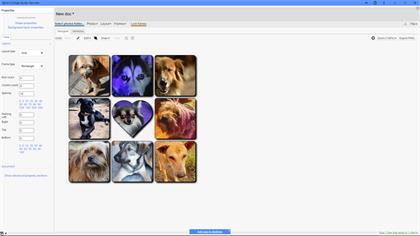
Create photo collages, really fast.
- Three different photo sources - file system, Google Photos and Google Drive.
- Layout versions - you can play with different layouts before deciding on the final one.
- Layout styles - large library of layouts.
- Custom layout styles - you can quickly create your own layout style.
- Frame styles - large library of frame styles.
- Custom frame styles - you can easily create your own frame style.
- Random photo assignments - quickly assign a frame to each photo in the selected photo source.
- Pattern backgrounds - choose from a vast library of patterns.
- Gradient backgrounds - choose from a vast library of predefined gradients.
Screenshots
Go here for some sample screenshots.
More
Check out this short YouTube video.
Check out screenshots and install from the Microsoft web store.
Launch the app.
File system integration
The app is (when installed) integrated with the host file system, i.e. you can use the 'Open with' feature to launch the app for a selected file.
Extensions that can be opened are:
- .collage
- .collaget
Note that you have to install the app to enable file system integration.
See also
You might also be interested in these other apps or add-ons.
 Bjorn's Photo Slides - a web app
Better Google Photos slideshows
Pricing
This app is in the TIER-1, a TIER-1 subscription costs $8.95 per month.
You can try the app for 7 days for free.
Note that a TIER-1 subscription covers all TIER-1 products.
There is a 5-user subscription with a great discount, $29.95 per month.
Use Bjorn's Account Manager to buy/manage your subscription.
Use your PayPal account to cancel your subscription.
Support
Please report bugs here or reach out 2 me with questions @ support@backlund.org.
Follow me at Instagram @bjornsplayground and check out more videos at my YouTube channel.
You can view our privacy policy here.

